Author: imbradmiller

  • How to Connect Things 3 to Claude Desktop with MCP

    How to Connect Things 3 to Claude Desktop with MCP

    A step-by-step guide to managing your tasks with AI

    If you use Things 3 as your task manager and Claude as your AI assistant, you can now connect the two directly — letting Claude read your tasks, create new ones, and help you manage projects using plain language. This is made possible through the Model Context Protocol (MCP), an open standard that lets Claude talk to local apps and services on your Mac.

    Here’s exactly how to get it set up, including the one gotcha that’ll likely trip you up (it got me).

    What You Need

    • Things 3 for Mac (the app itself)
    • Claude Desktop app (not claude.ai in your browser — the desktop app is required for local MCP servers)
    • uv, a Python package manager (we’ll install this)
    • Terminal access (basic comfort with copy/paste commands)

    Step 1 — Enable Things URLs

    The MCP server communicates with Things 3 via its URL scheme, so you need to turn that on first.

    In Things 3, go to Settings → General and check Enable Things URLs.
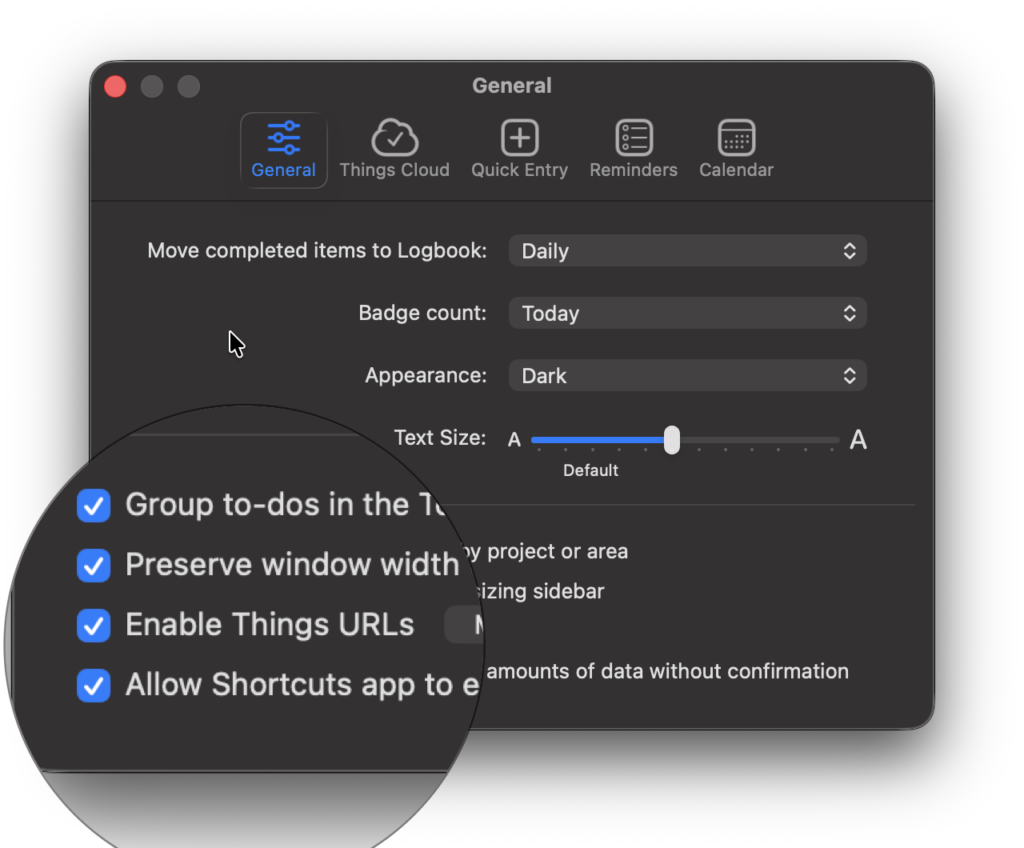
    Things by cultured code general settings screenshot.
    Enable Things URLS option in the General Settings.

    Step 2 — Install uv

    uv is a fast Python package manager that makes it easy to run the Things MCP server without a complex setup. Open Terminal and run:

    curl -LsSf https://astral.sh/uv/install.sh | sh

    After it finishes, close Terminal and reopen it. Then verify it installed correctly:

    which uvx

    You should see a path like /Users/yourname/.local/bin/uvx. Copy that path — you’ll need it in the next step.

    Step 3 — Configure Claude Desktop

    Claude Desktop uses a JSON config file to know which MCP servers to load. Open this file in any text editor:

    ~/Library/Application Support/Claude/claude_desktop_config.json

    Add the following inside the file (or merge it with any existing content you have):

    {
    
    "mcpServers": {
    
        "things": {
    
          "command": "/Users/yourname/.local/bin/uvx",
    
          "args": ["things-mcp"]
    
        }
    
      }
    
    }

    Important: Replace /Users/yourname/.local/bin/uvx with the actual path you got from the which uvx command. Using just “uvx” won’t work — Claude Desktop needs the full path.

    Step 4 — Restart Claude Desktop

    Fully quit Claude Desktop with Cmd+Q (don’t just close the window), then reopen it. When it loads, you should see a small MCP indicator in the bottom-right corner of the chat input area. Click it to confirm the Things server is connected.

    The Gotcha That Will Trip You Up

    The most common reason this fails: Claude Desktop can’t find uvx even after you’ve installed it. This is a PATH issue — Claude Desktop launches in a different environment than your Terminal session.

    The fix is simple: use the full absolute path to uvx in your config instead of just the command name. That’s why Step 2 has you run which uvx and copy the result.

    If you see “Could not connect to MCP server Things” in Claude Desktop, this is almost certainly the culprit. Update the command in your config to the full path, restart Claude Desktop, and it should connect.

    What You Can Do Once It’s Connected

    Once the MCP server is running, you can talk to Claude naturally about your tasks:

    • “What’s on my Today list?”
    • “Create a task to follow up with the client by Friday”
    • “What projects do I have in my Work area?”
    • “Which tasks in my Anytime list are more than two weeks old?”
    • “Help me plan out a new project with subtasks”

    Claude has full access to Inbox, Today, Upcoming, Anytime, Someday, and your custom projects and areas.

    Pro Tip

    Create a Claude Project with custom instructions describing how you use Things, like your areas, naming conventions, how you use tags, etc. This gives Claude context so it creates tasks that fit naturally into your existing system rather than generic ones.

    Worth the 10 Minutes

    The setup takes about 10 minutes once you know the steps. The result is that your task manager and your AI assistant can finally work together. No copy-pasting, no switching apps, just asking Claude what you need. Pretty awesome for my workflows.

  • School Pick Up—AI Helped

    School Pick Up—AI Helped

    I was doing some work before I had to go get my kiddo from school. The dreaded school pickup line, am I right? Or, does it need to be that bad?

    I’m working on a few capabilities decks and some strategy planning for a few agencies. I didn’t want to close my laptop, so I just walked away. With tools like ChatGPT and Claude, I can open my iPad and quickly pick up where I left off, and man that has been amazing.

    I had it organizing a deck, and since I’m a creative, I’m using Figma. So I love that I can connect things into a design system, where everything is organized and clean for future use. It can read things within Figma, and use your already completed design system!

    AI is a great tool, and with good strategy and planning you can really get mundane work done faster, and focus on deeper strategic thinking.

  • UX Design Is Like Predicting The Future

    UX Design Is Like Predicting The Future

    I think the reason I love UX and started Lift UX was because I loved predicting the future, and using data and user interactions to make well informed decisions. It felt like we were avoiding circumstances that were inevitable when you design something a certain way.

    It was our job to prepare for what the user could do, not what they will do. And to design an interface and system that could not only help them with their desired task, but to bring delight to everything else around it. That is design, that, is UX.

    I’m going to take some time over the next few months to think about the future, and how user experience impacts our lives. It’s a passion of mine and I think it could be a great way to hypothesize about design and technology in general.

  • Great Things Ahead in 2026

    Great Things Ahead in 2026

    A lot of people kick off the new year with resolutions. Some want to lose weight (yep, I’m working on that too). Others want to break bad habits—like not hanging up a towel after a shower. I’m looking at myself here. I’m sorry, Jen. (Pssst…This remains a sensitive topic in the Miller household.)

    But if I’m being honest, the thing I’ve always struggled with the most isn’t organization—it’s consistency. Specifically, writing things down and actually publishing them on my site. I’ve always had plenty of thoughts, ideas, and half-formed opinions rattling around in my head… they just don’t always make it out into the world.

    So instead of making a traditional New Year’s resolution (because we all know how those usually go), I’m making myself a promise: to write at least once a week. Nothing overly polished. No pressure for perfection. Just showing up, putting words on the page, and hitting publish. And if you happen to read these posts along the way, I’d love for you to help keep me accountable.


    So how were the Holidays?

    The holiday break gave me a lot of space to slow down and reflect. I spent a good amount of time with family—which, honestly, was exactly what I needed. There was a lot of laughter, a lot of noise, and a lot of moments that reminded me how quickly life keeps moving.

    Some of that time was spent doing the important stuff… like playing Rocket League on the PS5 with my kids. Competitive? Absolutely. Humbling? Also yes. We also had a blast with a new board game console called Board. It turned into one of those things that pulled everyone together without anyone staring at their own screen, which felt like a small miracle.

    Harrison’s holiday was very clearly defined by one thing, his new electric scooter. That thing barely stopped moving. Watching his excitement and confidence grow as he zipped around was a reminder of how powerful simple joys can be.

    Harrison showing off his new Segway scooter, also, don’t judge me on my dry patch of grass. I’m sure I’ll get a letter from the HOA for that. 😛

    On the quieter side of things, I used the end of the year to get some life and work logistics in order. I’ve been laying the groundwork to start doing some interesting work and consulting in 2026, and it felt good to approach that thoughtfully instead of reactively. Along those same lines, I finally set up a dedicated machine for music recording and production—something I’ve been wanting to get back to for a long time. Music has always been a creative outlet for me, and I’m really hoping to make that a more consistent part of my life again.

    Resting For The Future

    The holidays also gave me a real chance to unplug. Since my exit from Fueled at the end of June, I felt like I was able to create space to reset mentally and emotionally this holiday for the first time in a long time. That distance helped me gain some clarity around what I want more of and less of moving forward.

    I Got Inspired

    Part of what pushed me to commit to writing more consistently was seeing how often our friend Matt Mullenweg shows up and shares what’s on his mind. The guy has a lot on his plate, yet he still finds time to write regularly. That really stuck with me. If he can do it, I can definitely find 30–45 minutes a week to capture a thought, reflect on a week, or explore an idea that’s been bouncing around in my head.

    I don’t want this space to turn into a daily journal or a running log of what I did each day. My goal is to share more of my story—the experiences, lessons, mistakes, and small wins from the last few years. Hopefully, some of it will resonate. Maybe some of it will entertain. And if nothing else, it’ll be honest and authentic.

    Bring on 2026

    More than anything, I’m genuinely excited to close the door on 2025 and step into 2026 with clearer priorities—focusing on my faith, my marriage (we’ll be celebrating 20 years this year), my boys, and building a life that feels intentional but spontaneous.

    So here’s to a new year, a fresh start, and committing to putting ideas down—even if they come out messy or as a stream of consciousness. At least I’m giving it a real shot.

    Happy New Year.

  • The Most Important Thing You Can Do to Build Relationships

    I was having a conversation with my friend a few weeks ago and we were talking about how everyone is different with the way they sell their services. I mentioned to him that not everyone is the same and everyone has their own process. But one thing is for sure, clients and customers can see right through bullshit.

    Of course they agreed with me. But it got me thinking about this subject some more. I started thinking about the process of building relationships and how selling is exactly that, building relationships.

    (more…)